

Microsoft Ignite 2023 took place from November 14-17, 2023, as a hybrid event, online and onsite in Seattle. Under the headline “Experience AI transformation in action, online from anywhere“, Microsoft showcased over 100 new solutions or updates to existing products. Microsoft showed how much they focus on AI. AI and Copilot were the buzzwords that dominated the event. But Copilot was not all that Ignite had to offer. There were also other exciting news and developments outside of Copilot that we will take a closer look at. This blog article presents my top 10 takeaways from Microsoft Ignite 2023 with a focus on Modern Workplace, Security and Windows Server vNext.
Modern Workplace
#1 Microsoft Intune – Announcement of new Intune Suite features
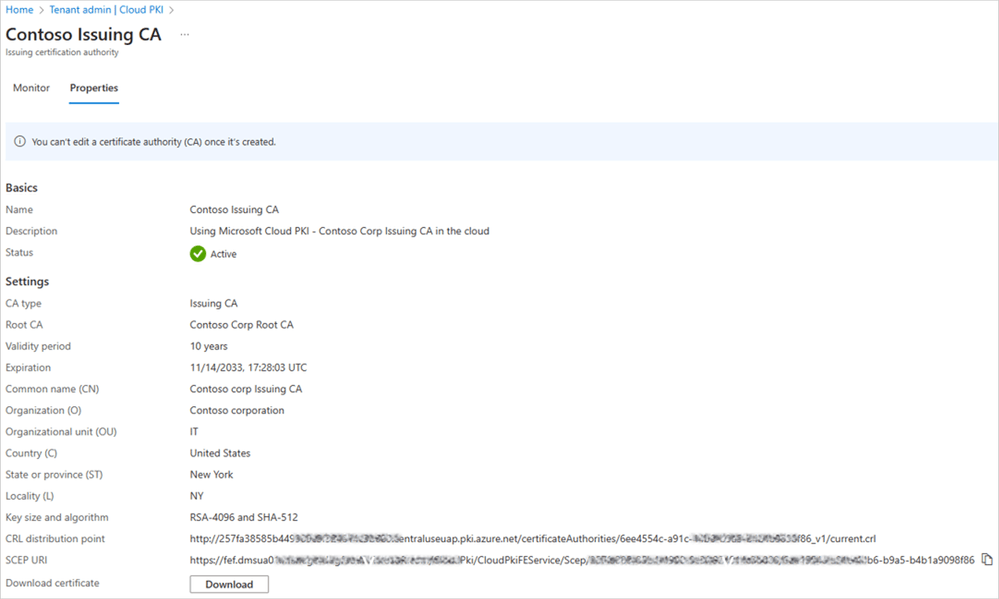
Microsoft unveils three new additions to the Intune Suite: Enterprise App Management, Cloud PKI and Microsoft Intune Advanced Analytics.
| Feature | Description | Availability |
| Microsoft Intune Enterprise App Management | Helps organizations keep their applications updated and secure, reducing the risk of cyberattacks. It also simplifies the packaging and deployment of applications by providing a prepackaged catalog of apps with editable metadata and install commands. Source and further information: Introducing Microsoft Intune Enterprise App Management | Microsoft Intune Blog | Availabe as a standalone add-on (2$) or included in Intune Suite (10$). February 2024. |
| Microsoft Cloud PKI | New cloud-based solution for public key infrastructure (PKI) that simplifies and automates certificate management for Intune-managed devices. It eliminates the need for on-premises servers, hardware, and infrastructure components. Source and further information: Microsoft Cloud PKI launches as a new addition to the Microsoft Intune Suite | Microsoft Intune Blog | Availabe as a standalone add-on (2$) or included in Intune Suite (10$). February 2024. |
| Microsoft Intune Advanced Analytics | Provides near real-time data and insights on devices to help IT admins improve users technology. Anomaly detection and device query: Features that enable IT admins to identify and troubleshoot potential issues with devices’ state and configuration using machine learning and Kusto queries. Battery health report: A feature that helps IT admins monitor and optimize the performance of devices’ batteries and plan for future device resources. Source and further information: Announcing Microsoft Intune Advanced Analytics | Microsoft Intune Blog | Availabe as a standalone add-on (5$) or included in Intune Suite (10$). February 2024. Announcement of new Intune Suite featur |
#2 Microsoft Intune – Security Copilot-embedded experience
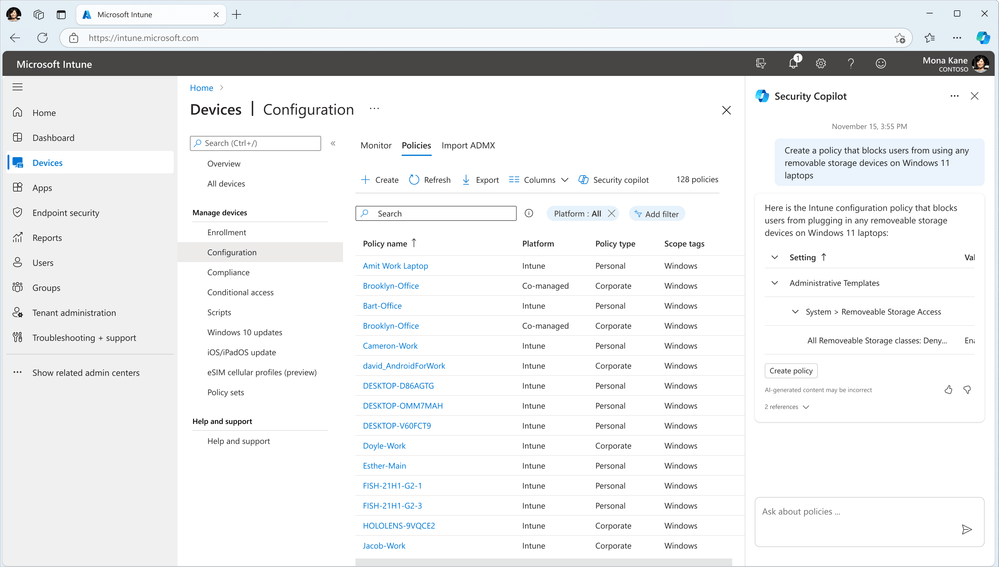
Security Copilot is a new AI-assisted cybersecurity solution from Microsoft that integrates with Intune and helps IT admins manage and secure their endpoints. Security Copilot will be embedded in Intune admin center, providing real-time guidance, policy creation, and troubleshooting for endpoint management and security. Security Copilot in Intune will be available in private preview for select customers of the Security Copilot Early Access Program in December 2023.
Source and further information:
Microsoft Intune introduces Security Copilot-embedded experience | Microsoft Intune Blog
#3 Microsoft Intune – New security features
The following new Microsoft Intune features were announced that help secure Windows devices.
| Feature | Description | Availability |
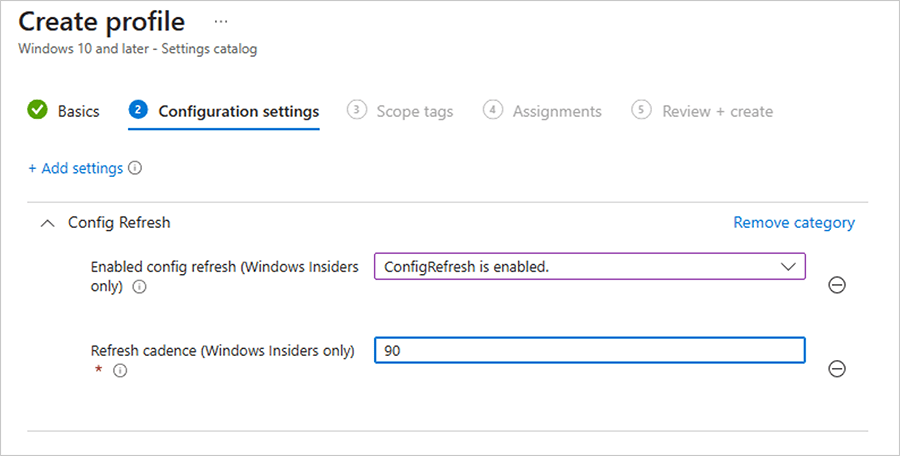
| Configuration refresh | Allows admins to refresh device configuration profiles on demand from the Intune console or PowerShell. This helps ensure that devices have the latest settings and policies applied. | Q1 2024 |
| New Windows security baseline | Introduces a new security baseline for Windows 11 and Windows 10 version 21H2. The baseline includes new settings and recommendations to help secure devices against common threats. | Q1 2024 |
| Windows hardware-backed device attestation report | Provides a report on the device attestation status of Windows devices. Device attestation is a process that verifies the integrity and identity of a device using a hardware-based security feature. This helps prevent unauthorized access to company resources from compromised devices. | Q1 2024 |
| Windows Subsystem for Linux (WSL) | Enables admins to manage and configure WSL on Windows devices using Intune. WSL allows users to run Linux applications and tools on Windows. Admins can control the installation, distribution, and settings of WSL on devices. | No dates announced yet |
| Microsoft Tunnel upgrades | Improves the performance and reliability of Microsoft Tunnel, a VPN solution that connects devices to on-premises resources. The upgrades include support for split tunneling, DNS suffixes, and custom ports. | No dates announced yet |
Source and further information:
New Microsoft Intune features help secure your Windows devices | Microsoft Intune Blog
#4 Windows 365/Azure Virtual Desktop – New features and enhancements
Windows 365 and Azure Virtual Desktop are Microsoft’s cloud solutions that enable you to access Windows from any device, anywhere, anytime. At Ignite 2023, Microsoft announced several new features and enhancements for both products.
| Feature | Description | Availability |
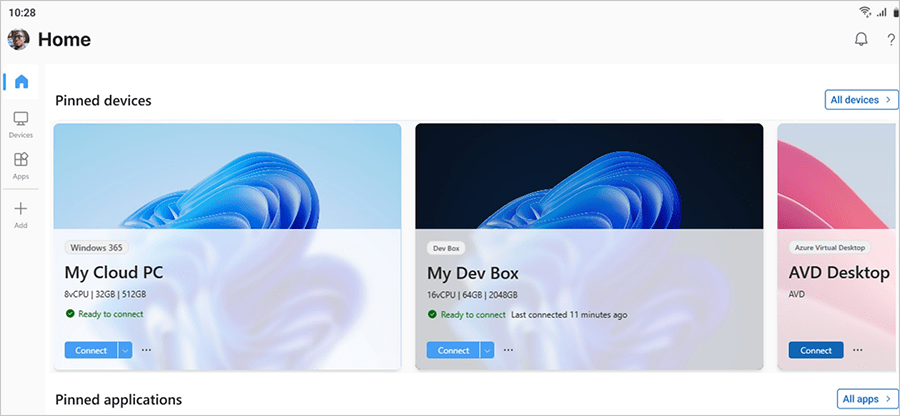
| Windows App | The place to connect to any devices or apps across Windows 365, Azure Virtual Desktop, Remote Desktop, Remote Desktop Services, Microsoft Dev Box, and more. | Available via the Microsoft Store for Windows devices, the web, or TestFlight for Apple devices. This is now in public preview. |
| Windows 365 GPU support | Makes it ideal for workloads such as graphic design, image and video rendering, 3D modeling, data processing, and visualization applications. | This is in preview. |
| Windows 365 AI capabilities for Cloud PC resizing | Offer recommendations to help you reduce costs, increase efficiency, and further simplify security and management of Windows 365 Cloud PCs. | This will come to public preview soon. |
| Single-sign on (SSO) and passwordless authentication support | Enables both Windows 365 and Azure Virtual Desktop users to sign in with their Microsoft account or a third-party identity provider without entering a password. | Now generally available, along with third-party IDP support. |
| Watermarking, screen capture protection, and tamper protection support | Helps protect against unauthorized access and manipulation of data, ensures the safety of sensitive information, and maintains organizational data integrity. | Now generally available for both Windows 365 and Azure Virtual Desktop. |
| Windows 365 Customer Lockbox | Ensures that Microsoft support engineers can’t access content to do service operations without explicit approval. | This is in public preview. |
| Windows 365 Customer Managed Keys | Allows organizations to encrypt Windows 365 Cloud PC disks utilizing their own encryption keys. | This will come to public preview soon. |
| Azure Virtual desktop Personal Desktop Autoscale | Automatically starts session host virtual machines according to schedule or using Start VM on Connect and then deallocates or hibernates session host virtual machines based on the user session state. | This is now generally available. |
| Azure Virtual Desktop for Azure Stack HCI | Brings an integrated cloud-native deployment experience in Azure Portal, powered by Azure Stack HCI Fall 2023 release. | This has new updates. |
| MSIX app attach assignment flexibility in Azure Virtual Desktop | Enables the installation of modern apps on any session host, per user, without requiring a maintenance window or session interruption8. It also helps separate the application lifecycle from image lifecycle, resulting in fewer gold images. | This is in public preview. |
| Azure Virtual Desktop FSLogix enhancements | Include settings from the Microsoft Intune Settings Catalog and the inclusion of the latest version of FSLogix in Azure Marketplace Windows multi-session images. | These are now generally available. |
Source and further information:
What’s new with Windows at Microsoft Ignite 2023!
Security
#5 Microsoft Defender XDR
Microsoft Defender 365 has become Microsoft Defender XDR. This new name reflects Microsoft’s extended detection and response (XDR) capabilities. Further feature announcements were also made.
| Feature | Description |
| End-user-to-cloud XDR | This feature integrates cloud workload alerts, signals, and asset information from Microsoft Defender for Cloud into Microsoft Defender XDR. This allows SOC teams to monitor, triage, and investigate multicloud alerts across Azure, AWS, and GCP. It also enables cross-workload correlations and cloud-specific content for better threat detection and response. Source and further information: Ignite news: XDR in an era of end-user-to-cloud cyberattacks and securing the use of AI |
| Securing the use of Generative AI apps | This feature extends the discovery capabilities of Microsoft Defender for Cloud Apps to over 400 generative AI apps, such as those using large language models (LLMs). This helps organizations gain visibility into the use and risk of these apps, and apply controls such as approving or blocking them. It also works with Microsoft Purview to secure and govern the data exchanged between the user and the app. Source and further information: Ignite news: XDR in an era of end-user-to-cloud cyberattacks and securing the use of AI |
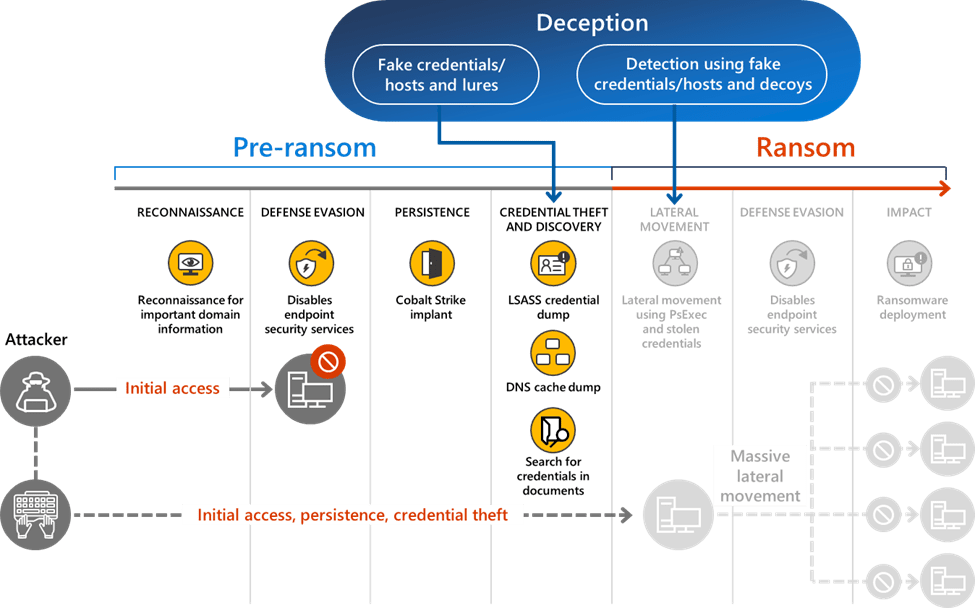
| Deception in Defender for Endpoint | This feature adds built-in deception capabilities to Microsoft Defender for Endpoint, an endpoint detection and response solution. With this feature, organizations can auto-generate and deploy authentic decoys and lures, such as users, hosts, documents, and more. These deception assets can trigger high-fidelity, early-stage signal and automatic attack disruption when adversaries interact with them. Source and further information: Ignite News: Augment your EDR with deception tactics to catch adversaries early |
| WSL support | A new plug-in for Windows Subsystem for Linux (WSL) allows security teams to monitor the containerized Linux environment and detect security events in all running WSL distributions. Source and further information: https://aka.ms/MSLearn/MDE-plugin-wsl |
| Security settings management is now GA | The General Availability of simplified security settings management in Defender for Endpoint. Source and further information: https://aka.ms/securitysettingsmanagementGAblog |
#6 Unified Platform with Microsoft Sentinel and Defender XDR
Microsoft announces a private preview of a new platform that combines the features and capabilities of Microsoft Sentinel, Microsoft Defender XDR and Microsoft Security Copilot. The platform aims to provide a single, effective solution for protecting the entire digital estate and boosting SOC efficiency with AI, automation, attack disruption and curated recommendations.
- The platform integrates Security Copilot, an AI assistant that helps analysts with complex and time-consuming workflows, such as incident investigation and response, natural language hunting, and expert code analysis. Security Copilot optimizes SOC efficiency across Microsoft Sentinel and Defender XDR data.
- The platform supports a more automated SOC that can disrupt active attacks at machine speed, containing the threat and limiting the impact. The platform extends the automated attack disruption capabilities of Microsoft Defender XDR to non-Microsoft data brought in through the SIEM, starting with SAP.
- The platform offers a new SOC optimization feature that provides recommendations to help manage costs, ensure value on all data ingested and better protect against threats. The feature suggests things like recommended data log tiers, adding relevant content on top of data or ingesting new sources to protect against relevant threats.
Source and further information:
Introducing a Unified Security Operations Platform with Microsoft Sentinel and Defender XDR
#7 Security Service Edge (SSE) – New announcements
Microsoft’s new Security Service Edge (SSE) solution called Global Secure Access has been available as a public preview since July 2023. New announcements have now been made regarding Microsoft Entra Internet Access and Microsoft Entra Private Access.
| Feature | Description | Availability |
| Microsoft Entra Internet Access | New Secure Web Gateway (SWG) solution that protects against malicious internet traffic. It helps secure access to internet, software as a service (SaaS), and Microsoft 365 apps for users and devices connecting from anywhere. | Currently, only Microsoft 365 Traffic (Exchange Online, SharePoint Online, OneDrive for Business) is supported in the Public Preview. According to the announcement, all Internet apps will be supported by the end of the year. |
| Microsoft Entra Private Access | It helps to secure access to private applications that are not yet available as cloud apps and have not yet been published to the Internet. Entra Private Access seeks to eliminate the reliance on outdated VPN solutions | In the published public preview from July 2023, only TCP traffic was previously supported. UDP and private DNS are now also supported. |
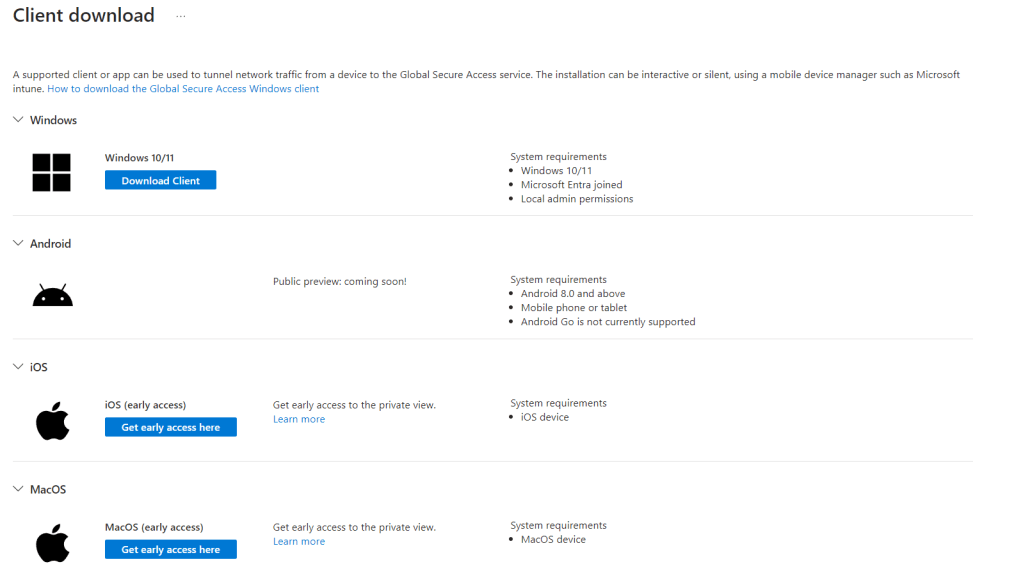
| Global Secure Access Client | To establish a connection to Microsoft’s Security Service Edge (SSE), the Global Secure Access Client is required for both Microsoft Entra Internet Access and Microsoft Entra Private Access. | In the published public preview from July 2023, only Windows 10 and 11 Client were supported. A public preview has now been announced for Android. A private preview is available for MacOS and iOS. |
Microsoft will not release the license model until the two products go GA.
Source and further information:
Protect access to all applications and resources with Security Service Edge
#8 Microsoft Entra gets a Security Copilot integration
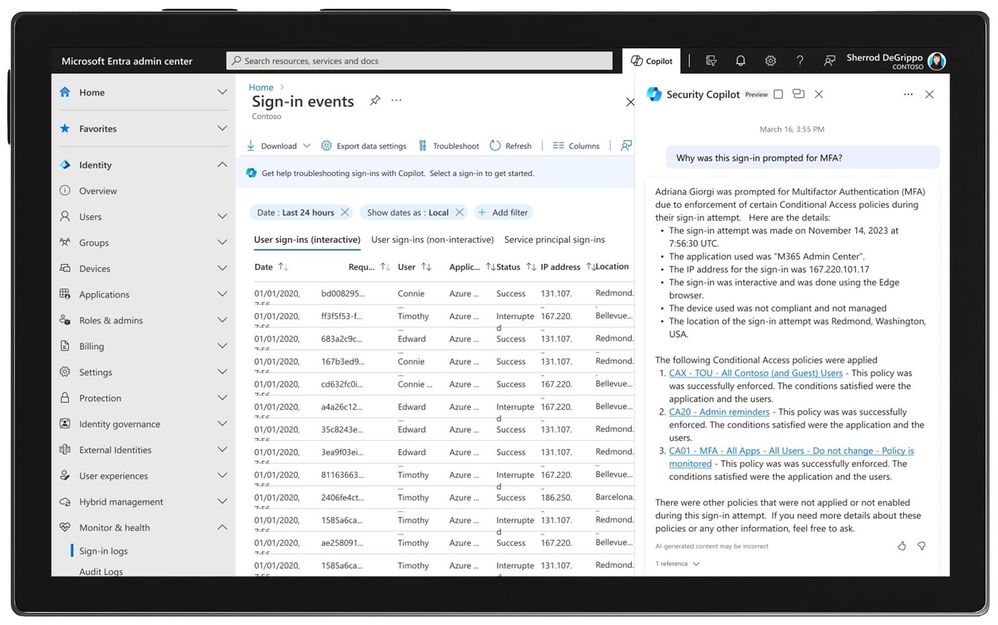
Microsoft Entra also receives a Security Copilot integration and helps automate, troubleshoot, and interpret security tasks. You can ask Security Copilot about Conditional Access policies, identity risks, sign-in logs, security alerts, and more. You can register today for the Security Copilot private preview, sign up to stay updated on all future developments.
Source and further information:
Microsoft Entra + Security Copilot
#9 Passkeys support for Microsoft Entra ID and the Microsoft Authenticator app
Passkeys are a new way to log in to your online accounts without a password. It is a digital key that is unique to your account and device and can only be unlocked by your biometric data, such as your fingerprint or face scan. Passkeys are phishing-resistant because they are based on Fast Identity Online (FIDO) authentication, which is resistant to phishing and other forms of attacks such as credential stuffing. The advantage of passkeys over a physical FIDO2 key is that you don’t need an additional device to authenticate yourself. You can simply use your smartphone, tablet or laptop, which already has a biometric sensor.
Passkeys will be supported as an authentication method in Microsoft Entra ID in a first public preview from January 2024. Passkeys will then also be supported in the Microsoft Authenticator app in early 2024.

Source and further information:
Passkeys support for Microsoft Entra ID and the Microsoft Authenticator App
Hybrid
#10 Windows Server vNext
Friday marked the initial in-depth exploration featuring Windows Server vNext. I highly recommend the What’s New in Windows Server v.Next session. Below are the key insights I gained from it.
Hotpatching
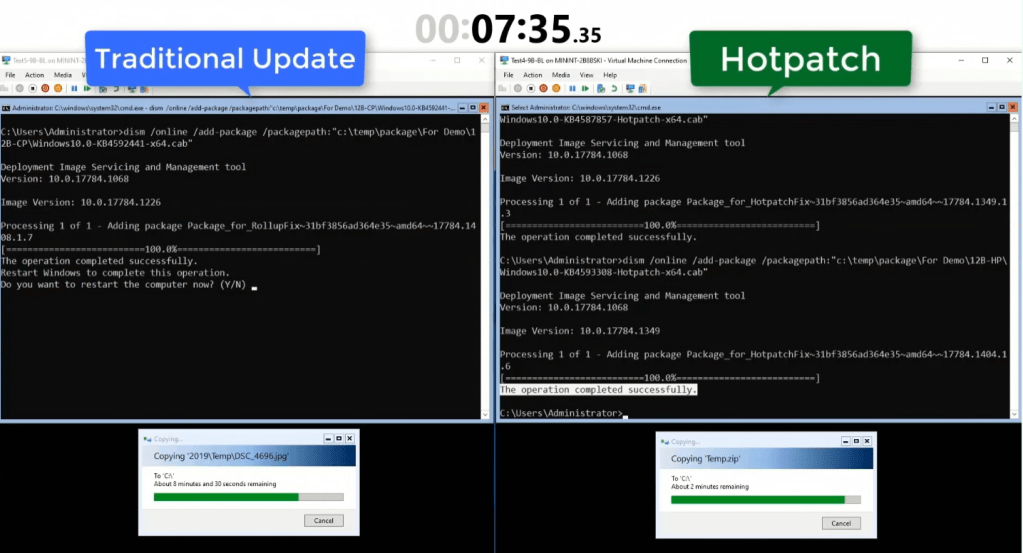
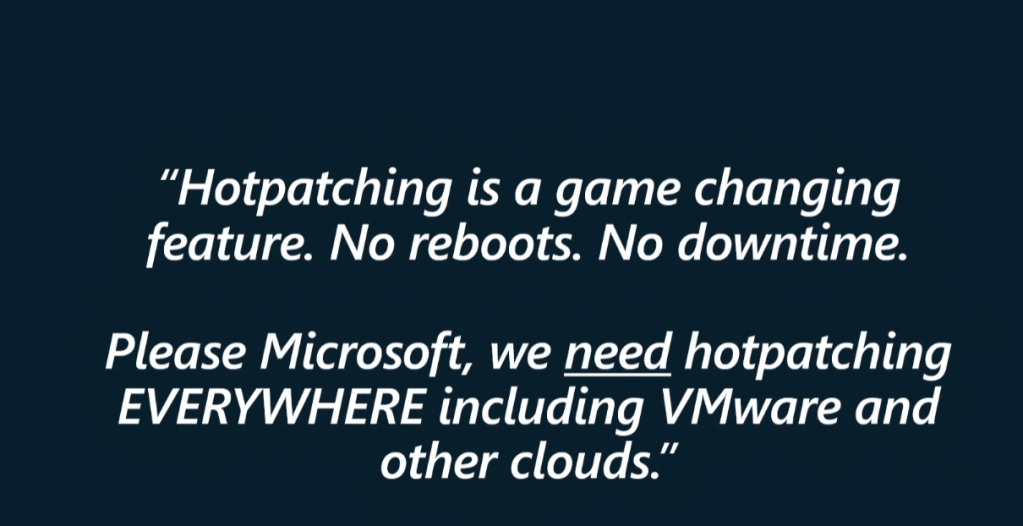
Hotpatching was already announced before Ignite 2023. Hotpatching lets you apply updates without restarting your system and disrupting your workloads. Hotpatching was developed by the Windows Kernel team, with the help of the Xbox team, who have experience in applying patches to games without requiring a restart. The goal of hotpatching is to increase the availability, security, and performance of Windows Server VMs, especially for scenarios that require continuous or near-continuous uptime, such as cloud services. Hotpatching works by first establishing a baseline with a Windows Update Latest Cumulative Update, and then periodically releasing hotpatches that build on that baseline, with updates that do not require a reboot.
At the What’s New in Windows Server v.Next session the following example was given:
A server farm of 1000 servers previously needed 3 weeks each month to deploy updates without downtime. With hotpatching this is now possible in less than 48 hours.
Arc-Enabled Hotpatching is supported on Windows Server Standard or Datacenter Edition. Physical, virtual, other clouds.
Source: https://ignite.microsoft.com/en-US/sessions/f3901190-1154-45e3-9726-d2498c26c2c9?source=sessions
Source: https://ignite.microsoft.com/en-US/sessions/f3901190-1154-45e3-9726-d2498c26c2c9?source=sessions
Source and further information:
Hotpatching for virtual machines
Next Generation Active Directory
At last, Active Directory has received a much-needed makeover.
| Feature | Description |
| Active Directory 32k DB Page Sizes | – A new domain controller is installed with a 32k page database and uses 64-bit Long Value IDs (LIDs) and runs in an “8k page mode” for compatibility with previews versions. – An upgraded Domain Controller continues to use its current database format and 8k pages. – Moving to 32k database pages is done on a forest-wide basis and requires that all Domain Controllers in the forest have a 32k page capable database. |
| Active Directory Perf & Scale Improvements | – AD DS now takes advantage of NUMA capable hardware by utilizing CPUs in all processor groups. – Additional Performance Monitor counters and updates Active Directory Diagnostic Data Collector Set. |
| Active Directory Security Enhancements | – LDAP support for TLS1.3. – Imrpoved security for confidential attributes. – LDAP prefers encryption by default. – Kerberos support for AES SHA256/384. – Change to default behavior of legacy SAM RPC password change methods. – Kerberos & PKINT supprt cryptographic agility. |
| Active Directory Replication Priority Boost | Initial replication to a new domain controller takes time. Issues on the source replica (reboots, network connectivity) may require re-replication of the entire replica, often for a different source. To speed up the process, a RootDSE modification can be used to give higher priority to some replication links. These links will be processed first in the replication queue. |
| New Active Directory Functional Level | – New Forest and Domain Functional Level: Windows Server vNext – New functional level required for new features. – There are no plans to backport these features. – New AD forest or AD LDS configuration set are required to have a functional level of Windows Server 2016 or greater. – Promotion of an AD or AD LDS replica required that the existing domain or config set is already running with a functional level of Windows Server 2016 or greater. |

Source and further information:
What’s new in Active Directory Domain Services Insider Preview
Local KDC & IAKerb
Windows now has a built-in Kerberos Key Distribution Service (KDC) for local user accounts, which allows Kerberos authentication without relying on domain controllers. Additionally, a new feature called IAKerb enables more flexible Kerberos negotiation for scenarios that involve classic AD, IP addresses, no SPNs, local KDC, or proxied auth. These improvements make Kerberos more robust and secure, while NTLM is gradually phased out and eventually removed.
Source and further information:
The evolution of Windows authentication
Next Generation SMB – SMB over QUIC
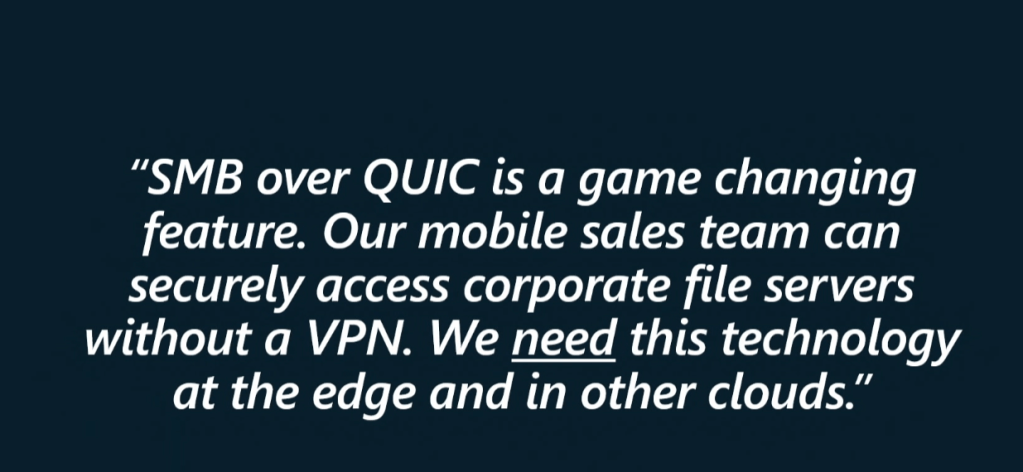
SMB over QUIC is a new feature in Windows Server 2022 that allows you to access files on a remote server over the internet using a secure and reliable protocol called QUIC. QUIC is faster and more resilient than TCP, the traditional protocol for SMB, and it works over port 443, which is usually open for web traffic. SMB over QUIC creates a TLS 1.3-encrypted tunnel between the client and the server, so that all SMB traffic, including authentication and authorization, is protected from network attacks.
Source: https://ignite.microsoft.com/en-US/sessions/f3901190-1154-45e3-9726-d2498c26c2c9?source=sessions
Source and further information:
SMB over QUIC
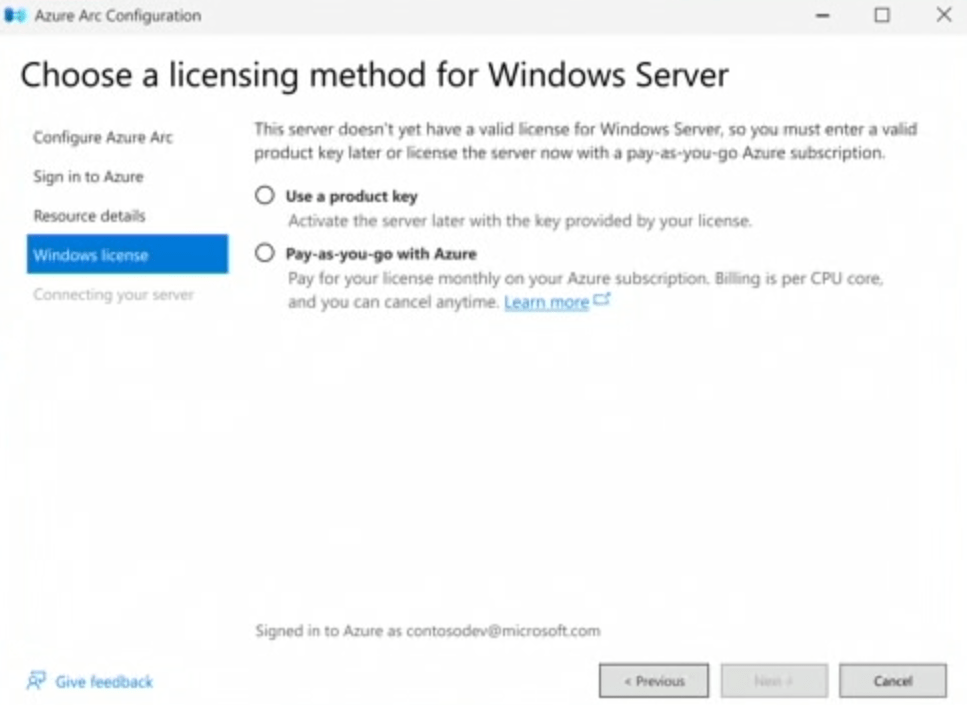
New Subscription based Purchasing Model
Pay for your license monthly on your Azure subscription (Windows Server Pay-as-you-Go). Billing is per core and you can cancel anytime. Product Key Activation will still work.
Source: https://ignite.microsoft.com/en-US/sessions/f3901190-1154-45e3-9726-d2498c26c2c9?source=sessions
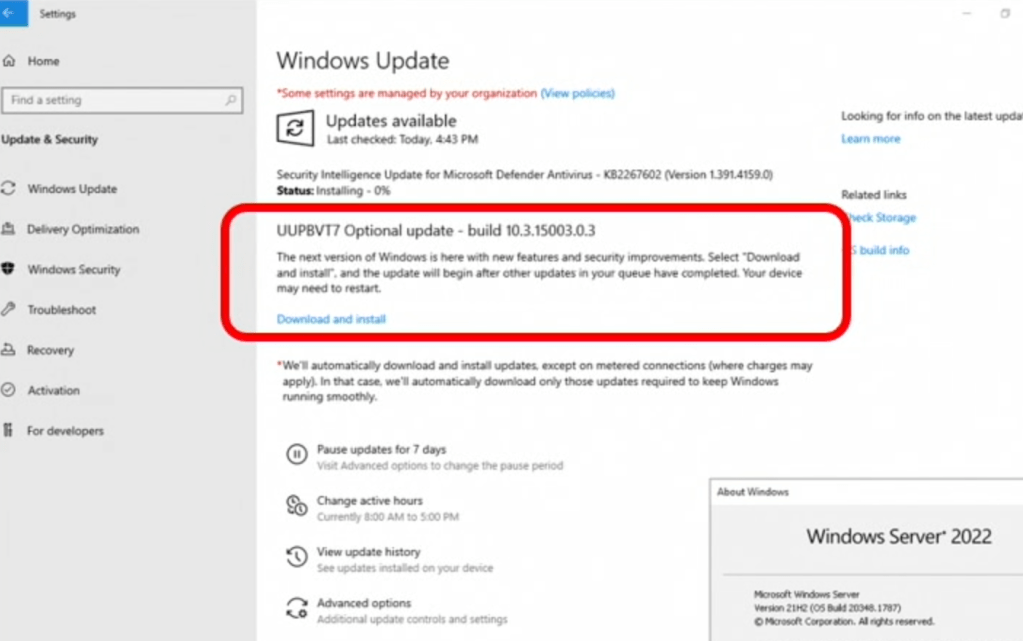
vNext Upgrade
You can easily upgrade from Windows Server 2022 to vNext using Windows Update.
Source: https://ignite.microsoft.com/en-US/sessions/f3901190-1154-45e3-9726-d2498c26c2c9?source=sessions
Call to Action
Microsoft invites users to try out vNext, explore the new features thoroughly and share their opinions. Microsoft plans to release a new preview build every 2 weeks:
Download Windows Server vNext from Windows Server Insiders
I would love to know your thoughts on Microsoft Ignite 2023 and which sessions and announcements caught your attention the most?
 Gobisweb